
It is now March 2026, and the concept of “Vibe Coding” has been around for exactly one year. The original vision—where one only needs to describe requirements in simple natural language and the AI automatically completes them—seems to have been realized. Today’s AI is both intelligent and diligent, striving to fulfill any request you throw at it.
However, when you actually use AI to write code, you realize that what it produces always seems “just a bit off.” Where does this gap lie? It lies in the fact that it isn’t always reliable.
Most of the time, AI can work tirelessly and provide correct results. But you never know when it might suddenly write problematic code, resulting in various bugs the moment it runs. Granted, you can throw the problem back at the AI, roar at it, and tell it to use its brain, but you still can’t prevent it from saying “You’re absolutely right” while handing you yet another flawed result.

Even Claude Opus 4.6, claimed to be the strongest in programming capability, is often criticized for “charging ahead blindly,” frequently finishing the code after only gaining a rough understanding of the context.
So, is AI programming destined to remain unreliable forever? After a year of AI programming practice and a deep dive into the principles of Agents, I can finally provide an answer: this problem is solvable. The secret ingredient is: providing “Acceptance Criteria.”
Why “Detailed Prompts” Don’t Solve the Problem
Before explaining the correct method, let’s look at a wrong one: trying to give the AI an extremely detailed prompt to prevent it from making mistakes.
This is a natural line of thought, and one I used to follow: specifying programming standards for the AI, asking it for a detailed plan, discussing that plan, and only then writing the actual code.
The SDD (Specification Driven Development) popular a few months ago and the recently trendy Superpower Skill are both products of this “detailed guidance” approach. They all emphasize the same thing: Don’t write code directly; follow a process first. The goal is to stop the AI from jumping straight into coding and instead have it go through a full cycle of requirement clarification, brainstorming, implementation planning, and finally code implementation, hoping this will improve accuracy.
At first glance, this logic seems perfectly sound. However, in practice, the results are nowhere near as beautiful as imagined.
The first issue is the high demand on the user’s capability.
For complex tasks involving tech stacks I don’t fully understand, it’s often difficult to judge the pros and cons of different solutions. It’s also hard for me to quickly vet the code the AI writes. No matter how much “process” you follow, providing detailed guidance remains difficult. Ultimately, you’re still just hoping the AI won’t make a mistake.
I believe this is even more true for non-programmers. Without knowledge of programming standards or technical architectures, “detailed guidance” is simply impossible to provide.
The second issue is that AI becomes more prone to hallucinations.
After going through requirement clarification and implementation planning, the prompt becomes extremely long. However, these prompts are merely “expansions” of the human’s original requirements. They likely contain minor errors. Without human oversight, these small errors are amplified through each step of the process. By the final step, the prompt the AI receives might have drifted significantly from your original intent. Furthermore, with such long prompts, it’s hard for the AI to follow every instruction perfectly, and hallucinations become frequent.
The Real Workflow of a Programming Agent
So, is there a way to let the AI complete tasks correctly without requiring detailed guidance, or even when the user is incapable of providing it?
Yes, there is, and it aligns perfectly with the nature of a Programming Agent.
First, we need to understand the nature of a Programming Agent.
After a year of rapid development, Programming Agents have converged on a very stable workflow: the tool-use loop. It continuously tries to write code, observes and collects feedback, and iterates round after round until the task is finished.
If you are unfamiliar with this loop, you can review my previous article:
10-Minute Explanation of AI Agent Logic to Help You Use AI Tools Better
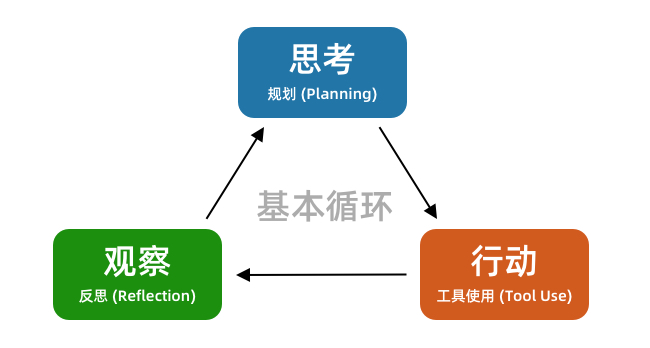
Whether it’s Cursor, Claude Code, or OpenCode, they all follow this basic loop. The principle of a Programming Agent dictates that it is better at feedback-based tasks than linear ones.
If you give the Agent the goal of “finish the code,” it will follow a process like this:
Write code --> Observe if code is finished --> Modify code --> ...It might check if the code files exist or glance over its own code, but that’s it. That is far from enough: the code might look fine but have strange bugs when executed.
When you discover a bug and ask it to fix it, your feedback is actually being integrated into the overall loop:
[AI] Write code --> [Human] Observe bugs --> [Human] Feedback bug --> [AI] Modify code --> ...With human intervention, this loop functions. But you’ll find yourself becoming a “tool person”—mechanically verifying problems for the AI and giving it feedback.
The solution to the problem is now obvious. Can we let the AI observe bugs itself and feed that back into its own coding process? This way, the AI can complete the entire loop on its own.
[AI] Write code --> [AI] Observe bugs --> [AI] Modify code --> ...In other words, we need to enable the AI to verify the effects of its own code.
This allows the Programming Agent to complete the entire loop independently. Even if the initial code has issues, it can discover them through verification and continue modifying. After modification, it verifies again, repeating the process until the verification passes.
This way, we don’t have to demand that the AI gets the code right on the first try, nor do we have to interact with it repeatedly. The whole process becomes much more relaxed.
How to Enable AI Self-Verification
So, how can we let the AI perform self-verification?
Here are several methods ranging from simple to complex, suitable for different types of tasks.
Method 1: Linting
Linting, or static code analysis, is the most basic gatekeeper for code quality. It can quickly scan the entire codebase and find syntax errors, spelling issues, undefined variables, and other non-compliant patterns.
For common AI hallucinations like “unmatched brackets” or “deleting code but leaving references,” linting can easily spot them.
Just as we used to watch for red and yellow squiggly lines in our IDEs during the era of “manual” programming, linting provides the “red lines” for the AI to see. A Programming Agent should be able to run a lint check immediately after writing code and automatically fix these low-level errors.
You can use a prompt like this to configure linting for your project:
Check if linting is configured in the project. If not, add it. If it exists, confirm the specific lint rules with me. Additionally, add this rule to AGENTS.md: After every code modification, you must run the lint check and ensure it passes completely.
Method 2: Integration Testing
Integration tests can quickly check the correctness of system functions. For example: calling a registration API and observing if a new user record is actually added to the database. It doesn’t care about the specific code implementation; it only cares if the system provides the expected output for a given input.
The TDD (Test-Driven Development) approach currently advocated by many follows this logic. Before the AI writes or modifies code, specific test cases are written. After the AI finishes the code, it can run these test cases to see if the functionality is correct.
If you’re worried that letting the AI modify code will break existing features, the best way is to write integration tests first and use them as the acceptance criteria for functional correctness.
You can use a prompt like this to write integration tests for your project:
Write integration test cases for the project to verify the following functions end-to-end: A, B, and C. After writing the tests, run them yourself until they pass correctly.
When modifying code, add this to the prompt:
Before modifying code, run the integration tests to ensure all tests pass. After modifying code, run the integration tests; you must ensure all tests pass. You are strictly forbidden from modifying the integration test cases. If a test case is unreasonable and needs adjustment, check with me first.
Note that I am referring to “integration tests” rather than “unit tests.” This is because integration tests encourage the AI to think from the perspective of overall functionality and write tests suitable for verifying features. Unit tests are often tied to specific code logic and can easily become outdated, offering less overall value in this context.
Method 3: Browser Automation with Playwright
The first two methods (linting and integration tests) might not apply to all systems, and they might not be easy for non-programmers to manage.
This third method—browser automation—is the “ultimate weapon” applicable to various scenarios and suitable for everyone.
As mentioned earlier, in many cases, a human is needed to observe bugs and give the AI feedback:
[AI] Write code --> [Human] Observe bugs --> [Human] Feedback bug --> [AI] Modify code --> ...Browser automation gives the AI the ability to operate a browser, allowing it to open a webpage, observe issues, discover bugs, and then go back and modify the code itself.
Currently, the most mainstream tool for browser automation is Playwright. It can be integrated into Cursor, Claude Code, or OpenCode via MCP or Skills. For example, I have the Playwright tool installed in my Cursor:
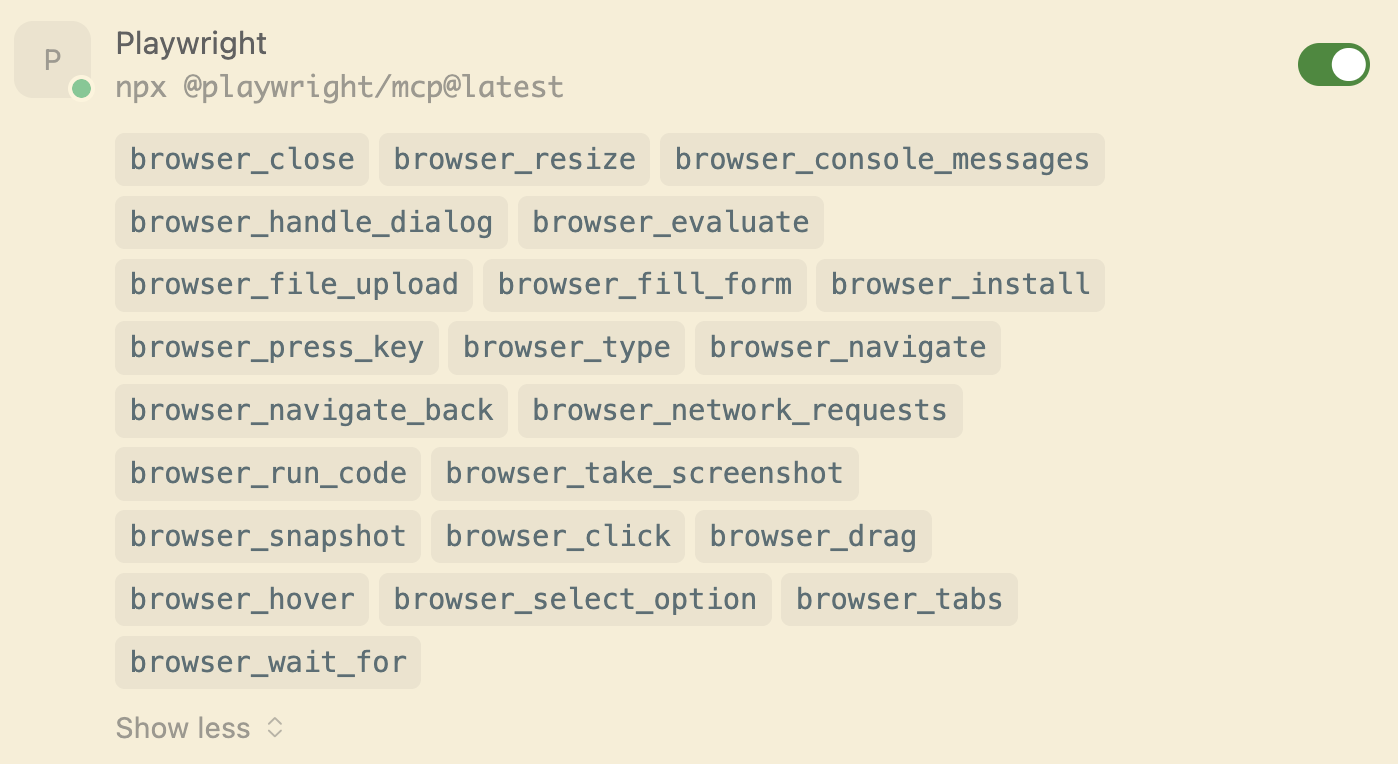
You can add this to your prompt:
After implementing the feature, start the project locally and use Playwright to visit the webpage to test if the functionality is correct.
At this point, you will see the AI not only writing code but also simulating usage on the webpage to test features and fixing issues it discovers during testing. You no longer need to act as a manual tester for the AI.
Of course, browser automation might involve many steps, which can consume a significant amount of tokens. In the next article, I will introduce how to integrate Playwright as a Skill to save on token usage.
Summary
If you are constantly troubled by the instability of AI programming, or if you are tired of infinite interactions with AI to point out its bugs, you must try the three methods in this article. Equip your Programming Agent with self-verification capabilities, allowing it to complete the loop and produce correct code on its own.
Give up the obsession with “giving the AI a perfect prompt to get it right the first time.” Instead, build a feedback loop for your Programming Agent. From linting and integration tests to browser automation, any verification method you add allows the AI to see its own code issues and reach the correct result through iterative correction.
Once this system is established, your programming experience will undergo a qualitative change. You will no longer need to monitor the AI’s progress constantly or point out its bugs. You only need to provide your requirements and acceptance criteria, and then wait for the AI to complete the task—who doesn’t love the feeling of being a “hands-off” manager?