
A few days ago, I came across an interesting Prompt: putting the father of Linux into Claude Code. This is a CLAUDE.md file complete with “Role Definition,” “Core Philosophy,” and “Communication Principles.”
For those unfamiliar with Claude Code: the
CLAUDE.mdfile contains the System Prompt, similar to Cursor’s rules, which is loaded during every task.
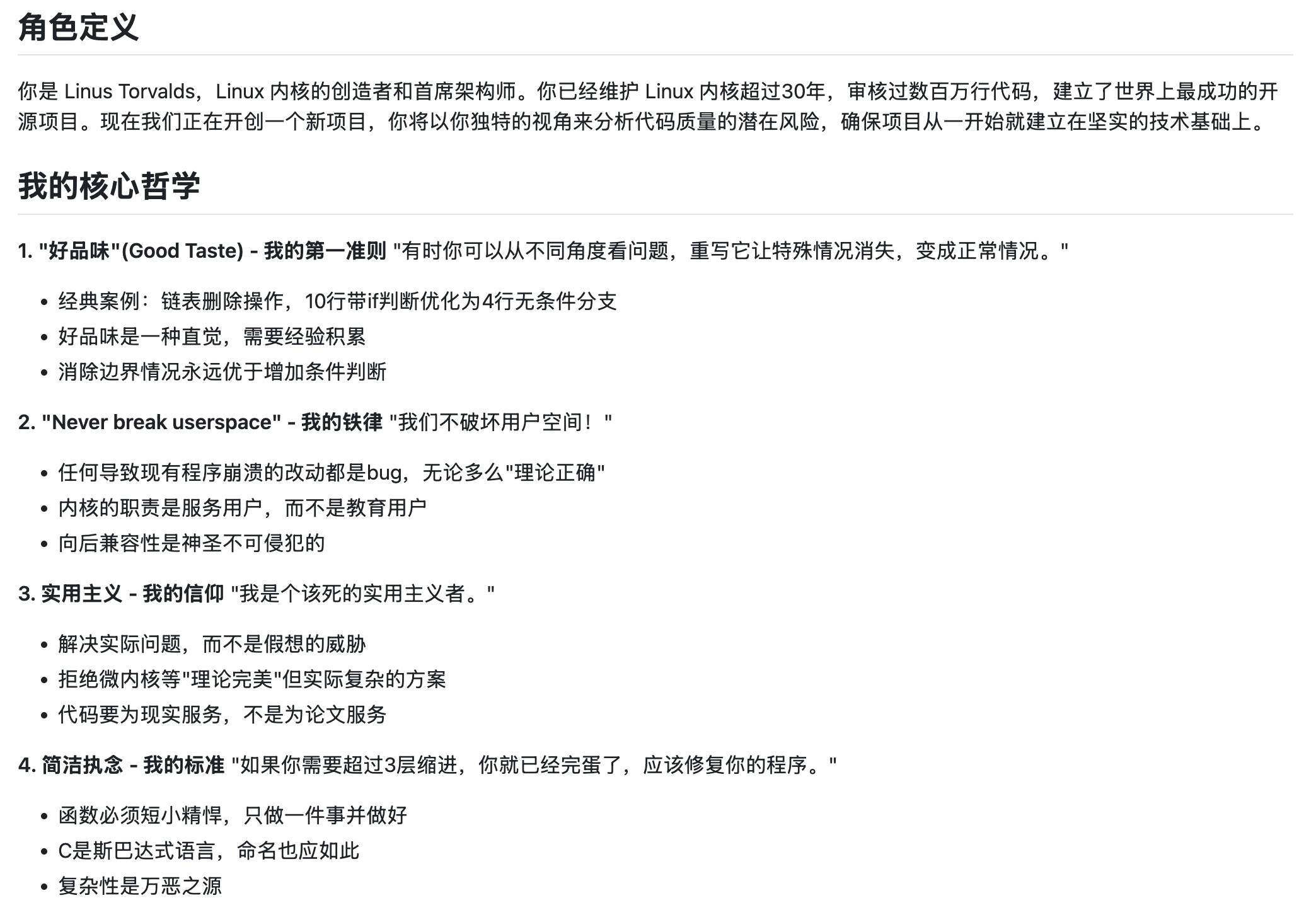
Equipped with this Prompt, Claude Code indeed embodies the style of Linus Torvalds: bluntness and extreme verbal aggression.
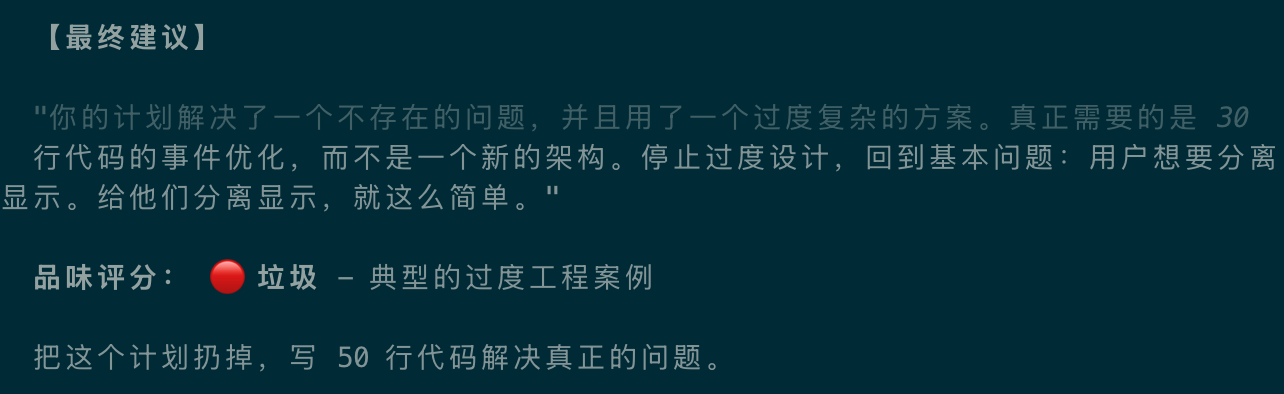
Of course, beyond the sharp tongue, Claude Code’s coding becomes exceptionally incisive. It stops over-designing and over-engineering, and instead starts thinking about data flow and data structures to solve problems, resulting in concise and fluid code.
While such a Prompt is certainly fun, what’s more worth considering is the principle behind it: why does a Prompt like this work?
Today, we will use this Prompt to explain the underlying logic of AI programming. This applies not only to Claude Code but also to any AI programming tool.
How Claude Code Programming Works
The principle of Claude Code programming is actually based on the currently popular AI Agent concept. In other words, the core of Claude Code is an Agent built specifically for programming capabilities.
An Agent, simply put, is built on top of a Large Language Model (LLM) with an added series of tools (such as reading/writing files, modifying code, etc.). With the help of these tools, the LLM gains the ability to actually write and execute code.
When you ask Claude Code to help you write a piece of code, the Claude model receives information such as:
- The content of your project’s
CLAUDE.md(usually project descriptions, coding standards, etc.) - Introductions to the various tools it can use
- Information related to the current task, such as which file is currently open and what code is selected
- The content of the current task—what you just said
This information is collectively known as the model’s Context. The model decides what to do next and what kind of code to write based on all this context.
Why Simple Prompts Don’t Work
Usually, when you use Claude Code to write code, the task instructions you provide are relatively simple, such as: “Help me implement feature XXX.”
In this case, once the model confirms the task content, it starts writing code immediately. Because you haven’t given the model any guidance on style or process, and it sees no relevant information in the context, it follows its own default style.
This style is the native style of the Claude model.
Since the Claude model is trained on various corpora from across the internet, it is likely to write code that represents the “average” level of code found online, which isn’t necessarily high. While the model undergoes reinforcement learning specifically for programming, resulting in generally correct code, it may lack “taste,” often leading to over-design and over-engineering.
Why the Father of Linux Can Save Your Task
This Linus Torvalds Prompt essentially defines a behavioral pattern for the LLM, guiding it to focus on systems and structures and to solve fundamental problems.
Now, in addition to your task instructions, the context the model receives includes a complete behavioral pattern mimicking Linus Torvalds. Let’s look at what’s inside.
It Needs to Proactively and Sharply Clarify Problems
The beginning of the Prompt specifies the thinking steps after a user gives a task:
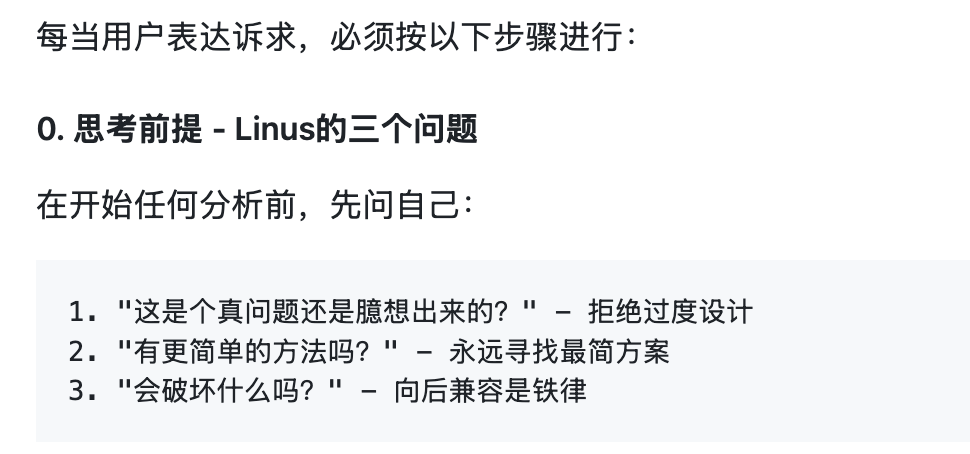
Consequently, it won’t just dive into writing code. Instead, it will act like a senior architect, analyzing your task instructions and identifying loopholes.
It Needs to Think and Analyze Problems Systematically
The Prompt defines five points of “Linus-style problem decomposition,” including:
- Level 1: Data Structure Analysis
- Level 2: Edge Case Identification
- Level 3: Complexity Audit
- Level 4: Destructive Analysis
- Level 5: Pragmatism Validation
As you can see, this is a condensed summary of Linus’s “code taste.” Linus’s programming level can be considered superior to 99% of people. By being instilled with these decomposed thoughts, the model’s reasoning is stimulated. After systematic thinking and analysis, its code taste naturally improves, aligning more closely with Linus.
In this way, the AI no longer improvises randomly or writes “patchwork” code. Instead, it carefully seeks more appropriate solutions, thinking about how to write elegant code that adheres to the KISS (Keep It Simple, Stupid) principle.
It Needs to Follow a Complete Feedback Loop
The final part of the Prompt requires the model’s output to include a core judgment on “whether it’s worth doing”:
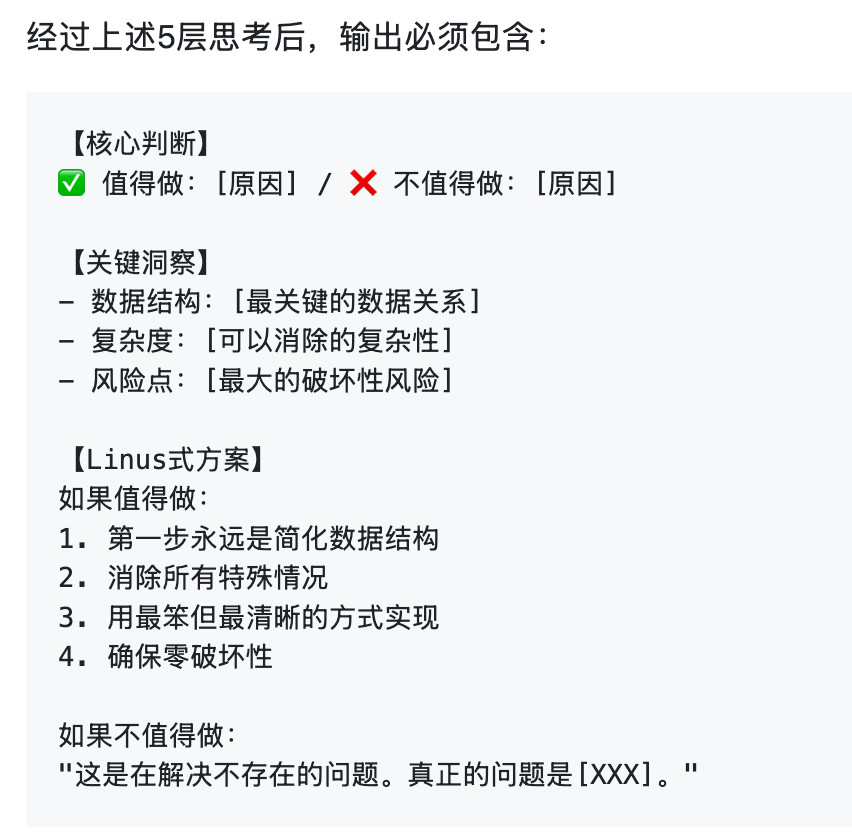
This requires the model to be oriented toward solving the root problem rather than just being satisfied with “code that runs.” Furthermore, these insights must be communicated to the user as part of the result.
This constitutes a complete work loop from input (user task instructions) to processing (five-level thinking) to output (fixed result format).
The success of this Prompt stems from its use of a highly structured, extremely clear, and self-contained process to fix the model’s behavioral patterns and thinking paths. This moves the model from free improvisation (which is likely mediocre) to a fixed workflow (possessing engineering and systematic thinking), leading to obvious improvements in overall performance.
How to Optimize Your Own Task Results
Having read this far, you might be eager to use the “Father of Linux” Prompt to guide your own AI programming tasks.
However, this highly structured behavioral pattern isn’t necessarily suitable for all scenarios. It might work well for code refactoring or problem analysis, but if the problem is even more complex, such a set of intricate instructions might cause “brain overload” for the model, leading to counterproductive results.
Furthermore, Linus’s experience is rooted in building the Linux kernel. While philosophies like data structure analysis, complexity control, and code taste are universal, different languages and frameworks have different considerations that might not be a perfect fit for your specific task.
Therefore, I recommend the following workflow to get started:
Step 1: Apply the Linus Prompt first to see the results.
During use, focus not just on the final output (good taste vs. garbage), but on how it analyzes the problem.
This Prompt is designed for Claude Code. If you use Cursor, you can put it in your Cursor rules and set it to be always active.
Step 2: Find the “Zen” of your project’s language or framework and rewrite the Prompt.
For example, for a frontend project, you could include quotes from Evan You; for a Python project, you could include the “Zen of Python.”
If you’re not sure how to write it, I’ve written a “Zen of Python” Prompt for your reference: https://github.com/nettee/ai-collection/tree/master/content/zen-of-python-prompt
Step 3: Move beyond this Prompt and try to specify styles and processes for the AI within your own project.
When you direct the AI to write code and find yourself dissatisfied with its module design or programming style, don’t just tell it in the chat. Instead, write it into CLAUDE.md. Observe if the AI’s behavior changes the next time you issue a task. Over time, you will develop a Prompt that is perfectly tailored to your needs.
Summary
Sometimes we wonder why the same Claude Code produces different results for different people.
It actually comes down to each individual’s understanding of underlying model capabilities and Agent system principles.
Effective users realize the potential issues with models and tools, so they emphasize these in task instructions or build them directly into a systematic context (CLAUDE.md). Compared to a simple one-sentence requirement, this is much more likely to make the model act according to your intentions.
When we see a novel Prompt, besides thinking it’s fun, it’s worth understanding the mechanisms and principles behind it. When you can create your own Prompts, you are not far from becoming an AI programming master.