
The Android developer website provides a state diagram for the Android Activity lifecycle:
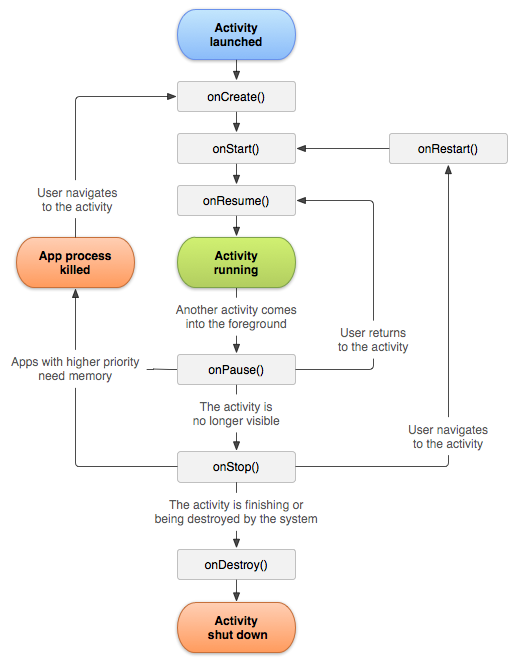
The rectangles in the diagram represent callback methods, and the arrows represent the order in which these callbacks are invoked. However, in the documentation table below the image, the onStart() method is described as follows:
Called when the activity is becoming visible to the user.
Followed by
onResume()if the activity comes to the foreground, oronStop()if it becomes hidden.
In other words, after onStart() is called, if the Activity comes to the foreground, onResume() is called next; if the Activity becomes hidden, onStop() is called next. However, the diagram does not show an edge leading from onStart() to onStop(). Is there a special case where onStop() is called immediately after onStart()?
In a question on StackOverflow, a respondent provided a scenario:
- Your current Activity (let’s call it A1) starts another non-full-screen Activity, such as a dialog (call it A2). At this point, A1’s
onPause()is called. - Press the Home button. At this point, A1’s
onStop()is called. - Restart the application. Now A1’s
onStart()is called, but because there is still a dialog in the foreground, A1’sonResume()will not be called. - Press the Home button again. Now A1’s
onStop()is called.
After writing an application to verify this, I found it indeed works. Here is the log information:
09-06 14:04:18.110 me.nettee.geoquiz D/QuizActivity: onCreate() called
09-06 14:04:18.190 me.nettee.geoquiz D/QuizActivity: onStart() called
09-06 14:04:18.190 me.nettee.geoquiz D/QuizActivity: onResume() called
09-06 14:04:20.410 me.nettee.geoquiz D/QuizActivity: onPause() called
09-06 14:04:20.805 me.nettee.geoquiz I/QuizActivity: onSaveInstanceState
09-06 14:04:21.730 me.nettee.geoquiz D/QuizActivity: onStop() called
09-06 14:04:22.530 me.nettee.geoquiz D/QuizActivity: onStart() called
09-06 14:04:23.385 me.nettee.geoquiz D/QuizActivity: onStop() called
Two conclusions can be drawn from this example:
-
In certain cases, the call to
onStop()can immediately follow the call toonStart(). -
Although the Android documentation states that the Started state after an Activity calls
onStart()is transient and will quickly lead toonResume(), in some situations, an Activity can remain in the Started state. A call toonStart()is not necessarily followed by a call toonResume().